What Instagram to Text Can Do With a Photo Post
The image itself gets refused
We built a 1080x1350 photo post with two lines of text drawn into the frame and saved it twice.
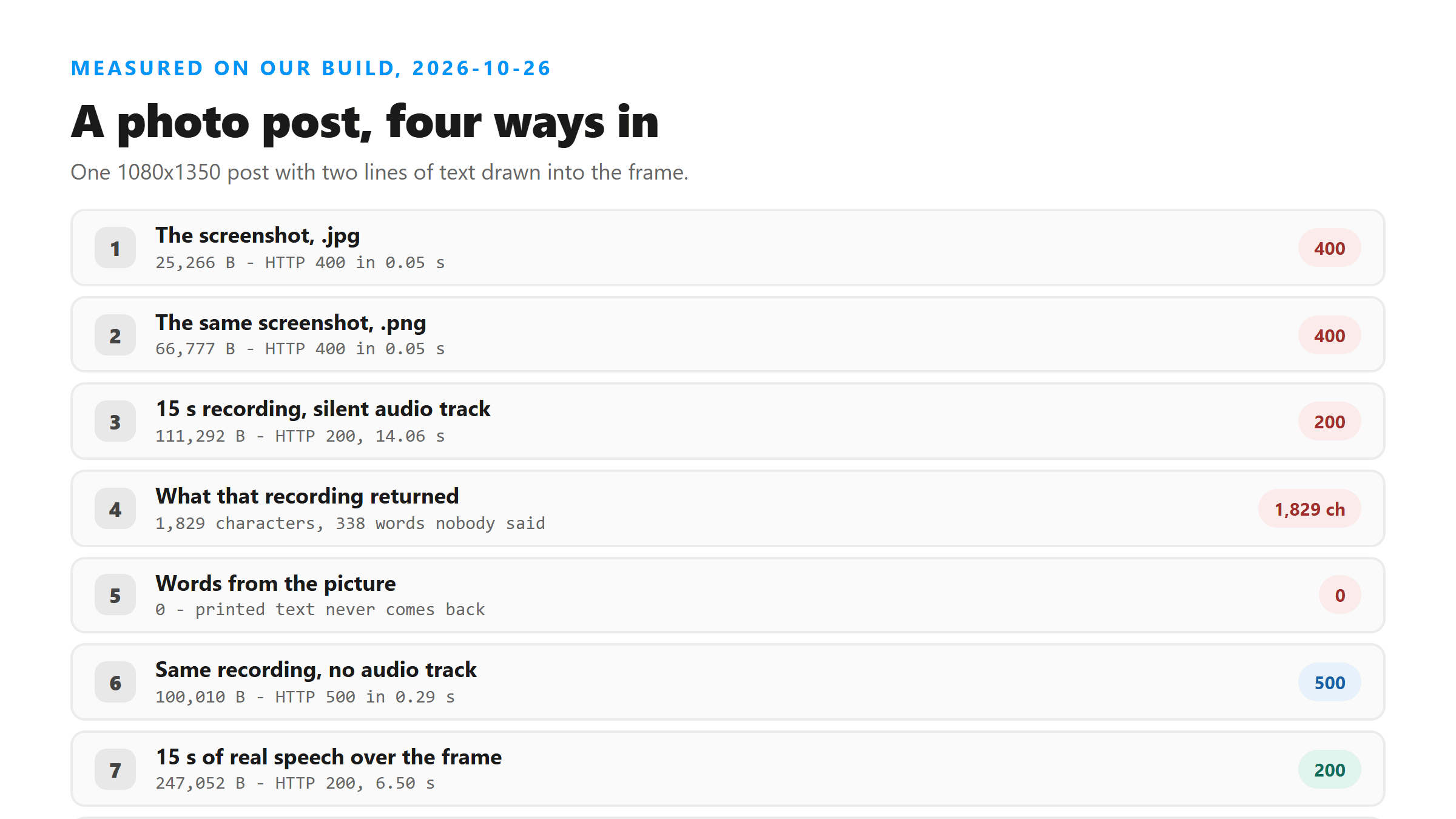
- 25,266-byte .jpg - HTTP 400 in 0.05 s
- 66,777-byte .png - HTTP 400 in 0.05 s
Both got the same message: "Unsupported file format. Please select MP3, WAV, M4A, AAC, OGG, FLAC, MP4, MOV, or WEBM." The refusal happens by file extension before anything is read, so renaming a screenshot won't sneak it past - and wouldn't help if it did. Reading text off a picture is a different job from listening to audio.
Recording the photo doesn't fix it
So we did what people actually do: record the screen while the photo is up. Fifteen seconds, a still frame, and a silent audio track so the file has audio in it.
- 111,292 bytes, 15 s, silent audio track - HTTP 200, success true, 14.06 s
- Result: 1,829 characters, 338 words
- Text: "Thank you very much." repeated until the file runs out
- Words from the picture: 0
That's the failure mode people report as "it made stuff up." The response looks healthy - HTTP 200, success true, no warning field - and 338 words is a lot of confident text for a photo.
Two checks that catch it
You don't need the original to spot a fake. Both of these worked on today's file.
- Characters per second. The photo recording ran about 122 per second. Real speech on this endpoint ran 15 to 17.
- Repetition. Every music and silence result we got today was one short sentence, or one short sentence repeated.
If the whole transcript is a sign-off, there was nothing to transcribe. Save yourself the editing.
Take the audio track out and it fails loudly instead
Same recording, encoded without any audio at all.
- 100,010 bytes, 15 s, no audio track - HTTP 500 in 0.29 s
- Message: "Transcription failed. Please try another supported file."
The loud failure is the useful one. A silent track gives you 338 invented words. A missing track gives you an error in under a third of a second. If you're going to record a photo post anyway, now you know which of the two you're inviting.
The one case that works
We kept the same still frame and put 15 seconds of real speech over it - the shape of someone talking through a photo they posted.
- 247,052 bytes, 15 s, speech over a still frame - HTTP 200, 6.50 s
- Result: 235 characters, 42 words - the spoken sentence, in order
- Words printed in the frame: still 0
So the rule is simple. Text that lives in pixels never comes back, at any size, in any container. Text that was spoken does. If a photo post has a voice-over, record it with the sound on. If it's a still image with a caption, there's nothing here to transcribe - the caption is text you can already copy.
The size trap
Worth noticing which file worked. The screenshot was 25,266 bytes and got refused. The recording that worked was 247,052 bytes, almost ten times bigger. Size was never the problem - the absence of a voice was.
That's the same thing we see on video files: a 16,335,390-byte clip uploads fine and a 44,850,268-byte one doesn't. Format and content decide the outcome long before bytes do.
Why we can't just go get the post
People ask why the tool can't take a link and do the rest. Instagram blocks server-side fetching of its media, so there's no path from a URL to a file that we could run without your session. That's the whole reason this site asks you for a file. For a photo post, the file you'd hand us is a picture, and pictures aren't audio.
Got a Reel you want as text? Upload the file and download the transcript as TXT, SRT, or VTT →
No converter can put a voice into a photo post - the only run that worked today was speech recorded over the still frame. Where Wondershare UniConverter does help is that recording: trim it to the part with speech, drop the picture, and write out a container this endpoint reads. It does not transcribe, and it will not find words nobody said.
FAQ
Can I turn a photo post into text?
Not from the image. Today a 25,266-byte .jpg and a 66,777-byte .png both returned HTTP 400 in 0.05 seconds with "Unsupported file format." A 15-second recording of the same photo came back with 1,829 characters nobody said, and 0 of the words printed in the frame.
Why did my screen recording come back with so many words?
Because silence and still frames get filled in. Our 15-second silent recording returned 338 words of "Thank you very much" repeated. Real speech on the same endpoint runs about 15 to 17 characters per second, so 122 per second is a giveaway.
Does it read text that's printed in the video?
No. We drew two lines into a still frame and spoke over it - 235 characters came back, all spoken, none of it the on-screen text.
What fails and what doesn't?
A recording with no audio track fails fast: HTTP 500 in 0.29 seconds. A recording with a silent audio track succeeds with invented text. Speech over the same frame gives you the real words.
Can you fetch the post from a link instead?
No. Instagram blocks server-side fetching of its media, so there is no path from a URL to an audio file we could run. Every route starts with a file you supply.