Instagram Captions vs a Transcript: What a Generator Gives You
The difference is a clock, not the words
Say the same sentence out loud and both tools hear it. The captions generator writes it down as three or four pieces, each one stamped with when it starts and when it stops, so a player can flash it over the picture. The transcript writes it down once, in order, with no stamp anywhere.
That one difference decides what each output is good for. Timed chunks can be burned into a video or shipped as a subtitle file. Untimed text can be read, searched, quoted, and pasted into a document - and nothing else. You can't display it over a picture, because nobody knows when each sentence happened.
Four lengths, measured today
We ran one recorded paragraph through the endpoint at four lengths, 16 kHz mono MP3 at 64 kbps, one upload each:
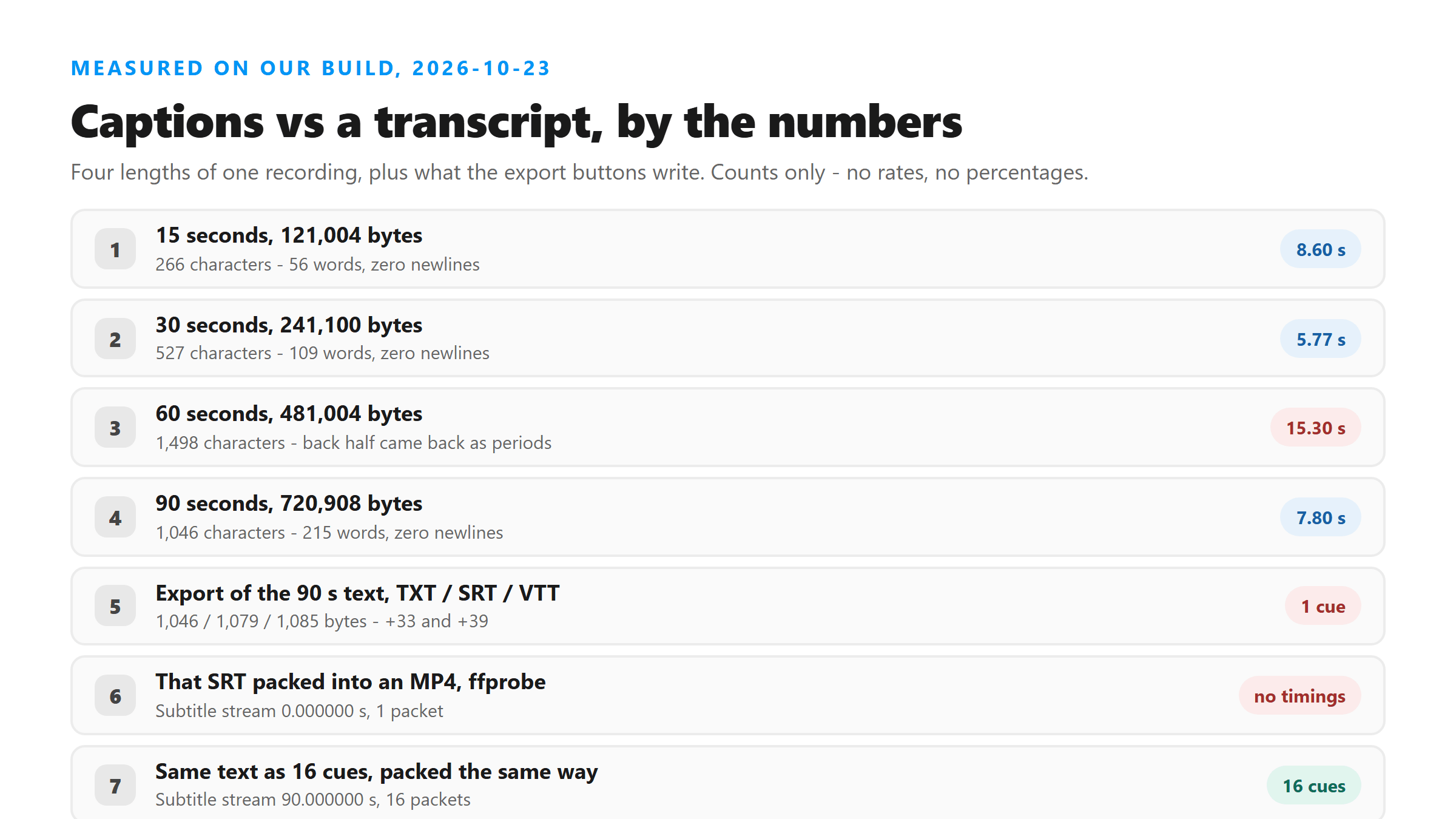
- 15 seconds, 121,004 bytes - 266 characters, 56 words, 8.60 s.
- 30 seconds, 241,100 bytes - 527 characters, 109 words, 5.77 s.
- 60 seconds, 481,004 bytes - 1,498 characters, 569 words, 15.30 s.
- 90 seconds, 720,908 bytes - 1,046 characters, 215 words, 7.80 s.
Two things in that list need a note. The 60-second file is the odd one out: 1,498 characters, and most of the back half came back as a run of periods rather than words. The same audio at 90 seconds was clean. We're leaving it in rather than quietly dropping the row. Second, all four responses carried zero newline characters. The text arrives as one paragraph, which is exactly the shape a caption file can't use.
One more caveat before you quote those word counts. The source is the same short paragraph looped to fill each length, and looping changes what the model returns - repeats collapse instead of stacking. Treat the numbers as the shape of the output, not as a benchmark for natural speech.
What the export buttons actually write
The page has three download buttons. The code behind them wraps the transcript text in fixed strings and writes a file - it doesn't compute timings, because there are no timings in the response to compute them from. Run on the 90-second text above, the three files come out at 1,046 bytes for TXT, 1,079 for SRT and 1,085 for VTT.
The SRT is one cue numbered 1, with the range 00:00:00,000 to 00:00:00,000, and the whole transcript under it. The VTT says the same thing in WebVTT form. We ran the identical export on the 15-second text and got 266 / 299 / 305 bytes - the overhead is 33 and 39 bytes every time, no matter how long the text is, because there's exactly one cue in there.
One cue with no duration can't be displayed
You can prove this on your own machine. We packed the 90-second SRT into an MP4 with ffmpeg using -c:s mov_text and read the subtitle stream back with ffprobe. It reported 0.000000 seconds and one packet. Then we rebuilt the same text as 16 cues - one per sentence, spread evenly over the 90 seconds - and packed that in. Same command, same container: 90.000000 seconds and 16 packets.
That's the whole gap between the two tools in one pair of numbers. A caption file needs a duration on every cue. Our response has no timing field, so the honest export is one cue with no duration, and a player has nothing to show you. Writing evenly spaced timings anyway would mean inventing them, which is the same reason we don't publish an accuracy score.
Silence won't cut it into caption-sized pieces
The obvious fix is to find the pauses and split there. We ran silencedetect over the 90-second file. It found five gaps, at 15.48, 31.14, 46.79, 62.45 and 78.10 seconds - each one about 0.4 seconds long. That's six blocks of roughly 15 seconds each.
Fifteen seconds is far too long for one screen. Those 215 words split six ways is about 36 words a block, and a caption screen holds somewhere around two short lines. So silence gives you scene-sized chunks, not caption-sized ones. You'd still have to cut each block down by hand or by rule.
Sentences don't rescue it either. The 90-second text breaks into 16 sentences, and we packed those as 16 cues spread evenly over the clip - that's the file that reported 90.000000 seconds and 16 packets. Sixteen sentences across 90 seconds is one cue every 5.6 seconds, and each one still carries more words than a screen holds. Sentence boundaries are free to compute, which is why they're the usual shortcut, but they're not the same thing as timings.
How many screens a transcript that size really is
Here's the arithmetic, and we're labeling it as arithmetic rather than measurement. 1,046 characters across 90 seconds is 11.6 characters per second. Two lines of about 37 characters is 74 characters a screen, so a full verbatim version of that clip is one screen every 6.4 seconds. Working captions usually sit around two seconds.
So a transcript and a caption track aren't the same text in two formats. They're different products: the caption track is the transcript cut down and re-timed, and the cutting is the work. Anyone promising captions straight out of a speech model is either guessing the timings or showing you text that never goes near the picture.
Which one you actually want
If the words have to sit on the video, you want a captions generator - or a subtitle editor where you can drag each cue to where it belongs. If the words are for you, a transcript is better: it keeps everything, it's searchable, and you can quote it. What you get here is the second one, on purpose. The response carries six fields and not one of them is a timing.
Got a Reel you want as text? Upload the file and download the transcript as TXT, SRT, or VTT →
Timings are the whole difference, and no export button can invent them. Corel VideoStudio Pro is a desktop editor where the text goes on a timeline and each cue gets dragged to where it belongs. It does not transcribe - the words still come back from this page, and the clock is the part you add.
FAQ
Is a transcript the same thing as captions?
No. Captions are short chunks with a start and end time on each, sized to sit on screen for a second or two. A transcript is the full text with no timings. Our 90-second test returned 1,046 characters and 215 words with zero newline characters and no timing field.
Why does the SRT file from this page have only one cue?
Because the response has no timing data to build cues from. The export writes one cue numbered 1, running 00:00:00,000 to 00:00:00,000, with the whole transcript under it. Packed into an MP4 and read back with ffprobe, that subtitle stream reports 0.000000 seconds and one packet.
Can I burn the transcript into my video as captions?
Not directly, and not honestly. You'd have to add timings yourself, and silence won't do it for you - silencedetect found five gaps in our 90-second clip, which is six blocks of about 15 seconds, roughly 36 words each. Far more than fits on a caption screen.
How much text does a Reel actually produce?
Our four runs today: 15 seconds gave 266 characters and 56 words, 30 seconds gave 527 and 109, 90 seconds gave 1,046 and 215. The 60-second run came back at 1,498 characters with the back half degenerating into periods. The source was a looped paragraph, so treat the counts as a shape, not a benchmark.